
Nissan Altima Warning Lights Guide
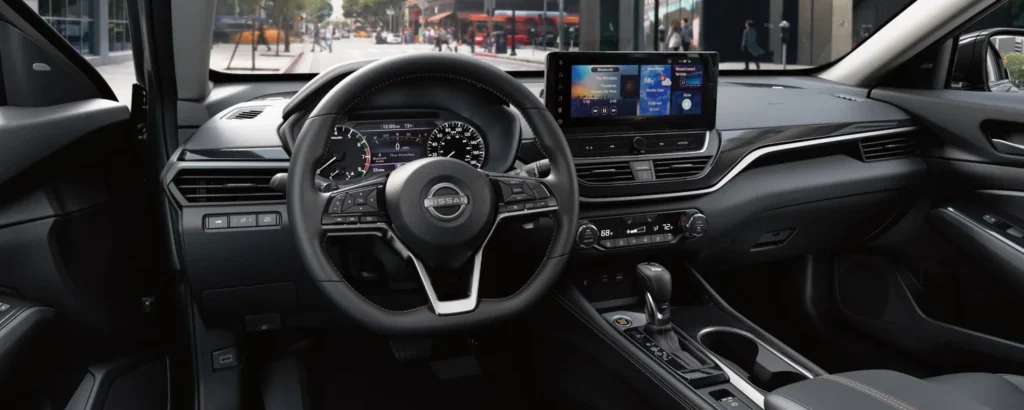
Nissan’s warning lights work like a stoplight. Green means functional, yellow encourages you to use caution, and red means there might be a real to pull over immediately. Lucky for you we’ve pulled out all the common red and yellow warning lights and their meanings in this guide!
Red Warning Lights for Nissan Altimas

Brake warning light
Dashboard symbol looks like: the word “brake” or an exclamation point inside of a circle
This light functions for both the parking brake and the foot brake systems.
Parking brake indicator: When the ignition switch is placed in the ON position, the light comes on when the parking brake is applied.
Low brake fluid warning light: When the ignition switch is placed in the ON position, the light warns of a low brake fluid level. If the light comes on while the engine is running with the parking brake not applied, stop the vehicle and perform the following:
1. Check the brake fluid level. Add brake fluid as necessary.
2. If the brake fluid level is correct, have the warning system checked.

Charge warning light
Dashboard symbol looks like: a rectangular car battery with a negative side and a positive side
If this light comes on while the engine is running, it may indicate the charging system is not functioning properly. Turn the engine off and check the generator belt. If the belt is loose, broken, or missing, or if the light remains on, have the system checked.

Electronic parking brake warning light
Dashboard symbol looks like: a “P” inside a circle
This light illuminates when the electronic parking brake system is operating. When the ignition switch is placed in the ON position, the electronic parking brake warning light illuminates. When the engine is started and the parking brake is released, the warning light turns off.
If the parking brake is not released, the electronic parking brake warning light remains illuminated. Ensure the electronic parking brake warning light has turned off before driving.
If the electronic parking brake warning light illuminates or flashes while the electronic parking brake system warning light (yellow) illuminates, it may indicate that the electronic parking brake system is not functioning properly. Have the system checked.

Engine oil pressure warning light
Dashboard symbol looks like: an oil container with a drop of oil
This light warns of low engine oil pressure. If the light flickers or comes on during normal driving, pull off the road in a safe area, stop the engine immediately and call a NISSAN dealer or other authorized repair shop.
The engine oil pressure warning light is not designed to indicate a low oil level. Use the dipstick to check the oil level.

Master warning light
Dashboard symbol looks like: an exclamation point inside a triangle
When the ignition is in the ON position, the master warning light illuminates if any of the following are displayed on the vehicle information display.
- Parking brake release warning
- Door open warning (while moving)
- Steering Alert hands-on detection warning
The warning(s) remain on the vehicle information display until action is taken, or the ignition is placed in the OFF position.

Security indicator light
Dashboard symbol looks like: a key inside a car
This light blinks when the ignition switch is placed in the OFF, LOCK or AUTO ACC position.
The blinking security indicator light indicates that the security systems equipped on the vehicle are operational.
Yellow Warning Lights for Nissan Altimas

Anti-lock braking system (ABS) warning light
Dashboard symbol looks like: the letter ABS inside a circle
When the ignition switch is placed in the ON position, the ABS warning light illuminates and then turns off. This indicates the ABS is operational.
If the ABS warning light illuminates while the engine is running or while driving, it may indicate the ABS is not functioning properly. Have the system checked. It is recommended that you visit a NISSAN dealer for this service.
If an ABS malfunction occurs, the anti-lock function is turned off. The brake system then operates normally but without antilock assistance.

Automatic Emergency Braking (AEB) system warning light
Dashboard symbol looks like: two cars bumping fenders
This light comes on when the ignition switch is placed in the ON position. It turns off after the engine is started.
This light blinks when the system is temporarily unavailable due to the camera operation limited by the windshield misted/ frozen/obstructed by dirt, strong light is shining from the front or high cabin temperature.
This light illuminates when the AEB with Pedestrian Detection system is set to OFF in the vehicle information display.
If the light illuminates when the AEB with Pedestrian Detection system is ON, it may indicate that the system is unavailable.

Electronic parking brake warning light (also red)
Dashboard symbol looks like: an exclamation inside a circle next to a wrench
The electronic parking brake system warning light functions for the electronic parking brake system. If the warning light illuminates, it may indicate the electronic parking brake system is not functioning properly. Have the system checked.

Low tire pressure warning light
Dashboard symbol looks like: an exclamation point inside a U-shape
Your vehicle is equipped with a Tire Pressure Monitoring System (TPMS) that monitors the tire pressure of all tires except the spare. The low tire pressure warning light warns of low tire pressure or indicates that the TPMS is not functioning properly. After the ignition switch is placed in the ON position, this light illuminates for about 1 second and turns off

Malfunction indicator light (MIL)
Dashboard symbol looks: similar to a check engine light
If this indicator light comes on steady or blinks while the engine is running, it may indicate a potential emission control malfunction. The MIL may also come on steady if the fuel-filler cap is loose or missing, or if the vehicle runs out of fuel. Check to make sure the fuel-filler cap is installed and closed tightly, and that the vehicle has at least 3 gallons (11.4 liters) of fuel in the fuel tank.

Power steering warning light
Dashboard symbol looks like: a steering wheel next to an exclamation point
When the ignition switch is placed in the ON position, the power steering warning light illuminates. After starting the engine, the power steering warning light turns off. This indicates the power steering is operational.
If the power steering warning light illuminates while the engine is running, it may indicate the power steering is not functioning properly and may need servicing. Have the power steering checked. It is recommended that you visit a NISSAN dealer for this service.
When the power steering warning light illuminates with the engine running, there will be no power assist for the steering, but you will still have control of the vehicle. At this time, greater steering effort is required to operate the steering wheel, especially in sharp turns and at low speeds.
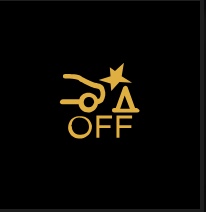
Rear Automatic Braking (RAB) system
Dashboard symbol looks like: a car backing into a traffic cone
This light comes on when the ignition switch is placed in the ON position. It turns off after the engine is started.
This light illuminates when the RAB system is turned off in the vehicle information display.
If the light illuminates when the RAB system is on, it may indicate that the system is unavailable.

Slip indicator light
Dashboard symbol looks like: a car swerving
This indicator light will blink when the Vehicle Dynamic Control (VDC) system is operating, thus alerting the driver to the fact that the road surface is slippery and the vehicle is nearing its traction limits.
You may feel or hear the system working; this is normal. The light will blink for a few seconds after the VDC system stops limiting wheel spin.
The indicator light also comes on when you place the ignition switch in the ON position. The light will turn off after approximately 2 seconds if the system is operational. If the light does not come on have the system checked.
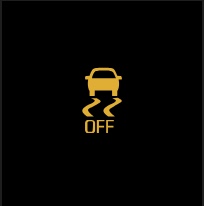
Vehicle Dynamic Control (VDC) OFF indicator light
Dashboard symbol looks like: a car swerving with the word “off” beneath
This indicator light comes on when the VDC is turned off in the vehicle information display. This indicates the VDC has been turned off. Turn the VDC on using the vehicle information display, or by restarting the engine.
The VDC light also comes on when the ignition switch is placed in the ON position. The light will turn off after a period of time if the system is operational. If the light stays on or comes on along with the indicator light while you are driving, have the VDC system checked.
While the VDC system is operating, you might feel a slight vibration or hear the system working when starting the vehicle or accelerating, but this is normal.
Didn’t find your warning light? Leave a comment below for us to add it!
Posted in: Nissan Altima
Do you have a question or idea you would like to be featured in a blog post?
Fill out this simple form.
2 responses to “Nissan Altima Warning Lights Guide”
Leave a Reply
Search Our Blog
Share This Post
Our RSS Feed
Dealership Info
Phone Numbers:
Main: 785-856-9220
Sales: 785-856-9220
Service: 785-856-9220
Parts: 785-856-9220
Sales Hours:
Mon - Thu 9:00 AM - 8:00 PM
Fri - Sat 9:00 AM - 6:00 PM
Sun Closed
Service & Parts Hours:
Mon - Fri 7:00 AM - 6:00 PM
Sat 8:00 AM - 1:00 PM
Sun Closed
Our New Address
Service 1226 E 23rd St.
Sales 1110 E 23rd St.
My sister bought a 2025 Nissan Altima, and when she starts the card, a symbol flashes yellow briefly. We can’t find it anywhere in the owner’s manual, or on any of the websites. It is located on the lowest section of the dashboard, midways, just in line with the shifter knob. I think it is just to the left of the battery symbol, but my memory may be incorrect as to that. It looks like a small vertical rectangle containing a vertical lightning bolt, with curved lines bracketing it. Any idea what it is or if she needs to have a service call?
Hi! Thanks for describing the symbol. I don’t want to guess from the description alone, but its location near the shifter makes me wonder whether it’s related to the wireless phone charger, if her Altima has one. The 2025 Altima owner’s manual says that charger’s indicator can light up or blink orange. We can’t identify the light reliably from a description alone. Please have your sister visit her local Nissan service department so a technician can identify the symbol and diagnose whether the vehicle needs service. 🔧